Sample report (PDF)
A complete Deep Search report exported from the app, showing the full written analysis and the sources behind it.
Open the PDF Swiss Army Tabs
Press & Media
Swiss Army Tabs indexes the pages you actually visit across Safari, Chrome, Edge, and Firefox, and lets you ask about them in plain language. The archive is cumulative and never rolls off, so it answers questions your browser's own history has already forgotten.
Everything on this page is a real result from a real browsing history, captured in the shipping app.
Deep Search · 29 languages
The same query was asked in five languages against an English-language browsing history. Deep Search returns its summary in the language of the question — it isn't translating the pages, it's reasoning about them and answering in kind. Version 3.1 supports 29 languages.
The pages in this history are in English. The questions are not. Deep Search has to find the right pages regardless of the language of the question, then explain them back in the language it was asked — including its own source-group headings. Page titles stay in their original language, as a reader would expect.
Mac and iPhone
Pages browsed in Safari on iPhone join the same archive as everything on the Mac, tagged by origin. Ask about something you read on your phone and Deep Search filters accordingly — below, it finds the Singapore article read on iPhone and explicitly rules out a Wikipedia page viewed in Edge on the Mac. The iPhone app searches the Mac's full archive remotely; if the Mac is asleep, the query waits and completes when it wakes.
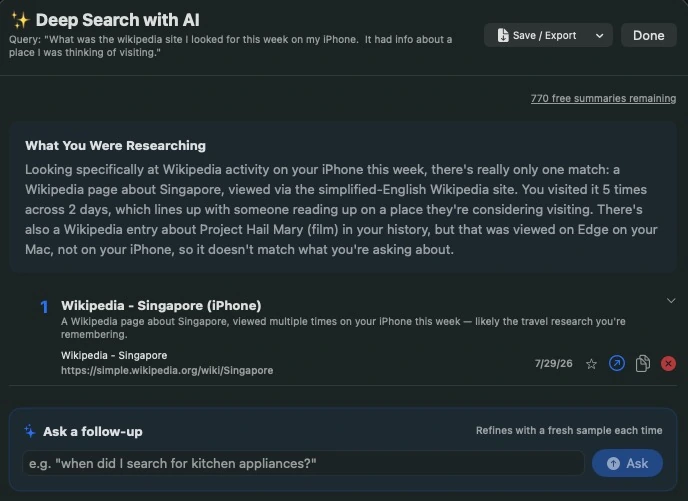
“What was the Wikipedia site I looked for this week on my iPhone? It had info about a place I was thinking of visiting.”
Deep Search finds the Singapore page read on the phone — and rules out a Project Hail Mary entry sitting in the same history, because that one was viewed in Edge on the Mac.
Nothing in the question named a site, a date, or a search term. The archive knows which device each page came from, so it can answer a question that is really about where you were, not what you typed.
Fast facts
Materials
A complete Deep Search report exported from the app, showing the full written analysis and the sources behind it.
Open the PDFThe same report read aloud, for listening rather than reading. Swiss Army Tabs writes the report; the narration was added for this demo.
Play the recordingBoth apps are live. The Mac app is the paid product; the iPhone companion is free and requires the Mac app to search.
Mac app iPhone appPrivate by design
There is no account and nothing to upload. Users choose which browsers the app reads. Private and incognito windows are excluded automatically. AI features run only when the user starts them.
Press enquiries